
Been breached? Get incident response help now.

Forensics and DFIR

Fetchy

Forensic acquisition and bulk transfer that finishes on time

Fetchy acquires disk images and moves large evidence sets securely between sites, picking up where it left off if the connection drops.

Best for
DFIR, IR, and large-scale evidence movement
Distribution
Single static binary; portable Linux ISO

The problem

Evidence transfers that take days, or restart after every network hiccup, put incident response windows and court deadlines at risk.

The outcome

Encrypted, resumable, hash-verified acquisition and transfer, so collection finishes on schedule.
In the product

A look at Fetchy

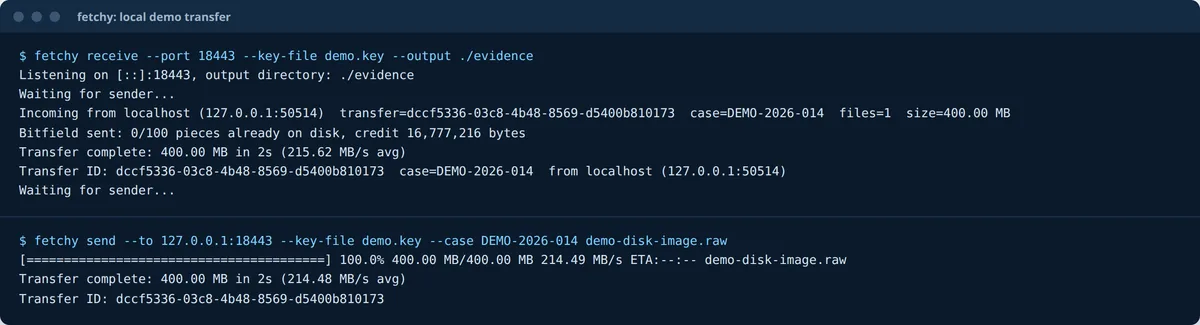
Fetchy terminal output: a receiver accepting an encrypted transfer and a sender completing it, tagged with a demonstration case number
A demonstration transfer between two terminals on one machine, using a random test file.

Key benefits

What Fetchy does for your team

  • Image disks remotely with integrity checks you can cite in a report
  • Encrypted transfers that resume from where they stopped
  • Verify delivered files against a saved manifest
  • Send a click-to-run collector to a remote site with its settings already embedded
  • Run from a single binary or portable boot media where you cannot install software
  • Tag transfers by case so evidence arrives organized

Features

Built for long, unattended transfers

  • Stays awake until the job is done

    Holds off idle sleep while it sends, acquires, or pulls, so a long transfer doesn’t stall overnight. The screen can still turn off.

    --allow-sleep to opt out

  • Picks up where it stopped

    After an interruption, pieces that already arrived intact are checked and skipped instead of sent again.

  • Keeps redialing

    Rides out ISP drops by reconnecting with backoff until every piece has landed.

    --persist

  • Parallel encrypted streams

    Four streams by default, adjustable from one to sixteen to make better use of the link.

    --connections

  • Gets through strict firewalls

    Uses the best open path to the collector and falls back to HTTPS when the others are blocked.

  • Verified on arrival

    Every piece is hashed on the receiver from the bytes on disk, with an optional whole-file SHA-256 or SHA3-256.

    --digest

  • Check delivered files any time

    Compare files against the receiver’s manifest to confirm nothing changed.

    fetchy verify

  • One collector, many customers

    A separate key per customer, with each customer’s files landing in their own folder.

    --key-dir

  • Organized by case

    Tag a transfer and it arrives in that case’s folder.

    --case

  • Tool locker

    Analysts pull approved tools from the same collector. The locker is read-only.

    fetchy get

  • Remote imaging and triage

    Image a disk, or collect triage data or Linux memory, straight to the collector.

    fetchy acquire

  • Click-to-run collector

    Build an agent with the collector settings already inside for a remote site to run.

    fetchy generate-agent

  • Custody records

    The receiver logs every transfer, and senders can write their own JSON record.

    --log

  • Live progress

    Speed and time remaining, measured from when data actually starts moving.

  • One tool on every desk

    Windows, macOS, and Linux, on Intel/AMD and Arm.

How Fetchy connects

Gets through the network you have

Both ends prove they hold the same key, and every transfer is encrypted with TLS 1.3. The sender always dials out, so it can work from behind home routers and carrier NAT.

Direct send and receive The sender dials the collector directly. The connection is encrypted end to end with TLS 1.3 and a shared key. Fetchy uses the best open path, falls back to HTTPS when firewalls are strict, and resumes after drops. SenderField device CollectorYour lab Encrypted end to end TLS 1.3 with a shared key Best open path HTTPS fallback Resumes after drops
Direct. The sender dials your collector and Fetchy picks the best open path, falling back to HTTPS when strict firewalls block the faster options.
Through a redirector The sender dials a public redirector, and the redirector forwards the connection to a collector it can reach. Encryption runs from the sender all the way to the collector. The redirector holds no key and cannot read the data, and senders only ever see the redirector's address. Encrypted end to end SenderDials out RedirectorForwards only CollectorYour lab No key on it Can't read data Lab address hidden
Through a redirector. The usual field setup. Senders dial a redirector, a relay host that forwards each connection to your collector. It holds no key and can't read your data, and senders never see the collector's address.
Reverse-connect relay for double NAT and carrier NAT When the collector cannot accept inbound connections, for example behind double NAT or carrier NAT, the collector dials out to a relay and waits there. The sender also dials out to the relay, which joins the two connections. Neither side opens an inbound port, and the relay holds no customer key, so the transfer stays encrypted end to end. RelayNo customer key Home or carrier NAT SenderDials out Office NAT or firewall CollectorDials out too No inbound Both sides dial out. No ports to open.
Reverse-connect relay. For double NAT or carrier NAT, when the collector can't accept inbound connections. The collector dials out to the relay and waits; senders dial the same relay. The relay holds no customer key, so the transfer stays encrypted end to end.
Which path gets used When you set up a collector: if it can accept inbound connections, senders either reach it directly or, more commonly, through a redirector that keeps its address private. If it cannot accept inbound connections, it uses a reverse-connect relay where both sides dial out. Every path is encrypted end to end. Set up a collector Accepts inbound connections? Yes No Keep its address private? Yes No RedirectorUsual setup DirectSender dials lab Reverse-connect relayBoth sides dial out Double NAT, carrier NAT Every path is encrypted end to end
Which path gets used. You choose the route when you set up the collector. A redirector in front of a reachable collector is the usual field setup; the reverse-connect relay is for collectors that can't accept inbound connections.

Move evidence on your timeline

Tell us where your evidence lives and where it needs to go, and we will show you how Fetchy handles it.

Talk to us about Fetchy